
ICSharpCode.AvalonEdit is the WPF-based text editor that I've written for SharpDevelop 4.0. It is meant as a replacement for ICSharpCode.TextEditor, but should be:
Extensible means that I wanted SharpDevelop AddIns to be able to add features to the text editor. For example, an AddIn should be able to allow inserting images into comments - this way you could put stuff like class diagrams right into the source code!
With, Easy to use, I'm referring to the programming API. It should just work™. For example, this means if you change the document text, the editor should automatically redraw without having to call Invalidate(). And if you do something wrong, you should get a meaningful exception, not corrupted state and crash later at an unrelated location.
Better at handling large files means that the editor should be able to handle large files (e.g. the mscorlib XML documentation file, 7 MB, 74100 LOC), even when features like folding (code collapsing) are enabled.
The main class of the editor is ICSharpCode.AvalonEdit.TextEditor.
You can use it just similar to a normal WPF TextBox:
<avalonEdit:TextEditor
	xmlns:avalonEdit="http://icsharpcode.net/sharpdevelop/avalonedit"
	Name="textEditor"
	FontFamily="Consolas"
	FontSize="10pt"/>
To enable syntax highlighting, use:
textEditor.SyntaxHighlighting = HighlightingManager.Instance.GetDefinitionByExtension(".cs");
AvalonEdit has syntax highlighting definitions built in for:
ASP.NET, Batch files, Boo, Coco/R grammars, C++, C#, HTML, Java, JavaScript, Patch files, PHP, TeX, VB.NET, XML
If you need more of AvalonEdit than a simple text box with syntax highlighting, you will first have to learn more about the architecture of AvalonEdit.
So, what is the model of a text editor that has support for complex features like syntax highlighting and folding?
Would you expect to be able to access collapsed text using the document model, given that the text is folded away?
Is the syntax highlighting part of the model?
In my quest for a good representation of the model, I decided on a radical strategy:
if it's not a char, it's not in the model!
The main class of the model is ICSharpCode.AvalonEdit.Document.TextDocument,
and it's sort of a StringBuilder with events.
Simplified definition of TextDocument:
public sealed class TextDocument : ITextSource
{
    public event EventHandler UpdateStarted;
    public event EventHandler<DocumentChangeEventArgs> Changing;
    public event EventHandler<DocumentChangeEventArgs> Changed;
    public event EventHandler TextChanged;
    public event EventHandler UpdateFinished;

    public TextAnchor CreateAnchor(int offset);
    public ITextSource CreateSnapshot();

    public IList<DocumentLine> Lines { get; }
    public DocumentLine GetLineByNumber(int number);
    public DocumentLine GetLineByOffset(int offset);
    public TextLocation GetLocation(int offset);
    public int GetOffset(int line, int column);

    public char GetCharAt(int offset);
    public string GetText(int offset, int length);

    public void BeginUpdate();
    public bool IsInUpdate { get; }
    public void EndUpdate();

    public void Insert(int offset, string text);
    public void Remove(int offset, int length);
    public void Replace(int offset, int length, string text);

    public string Text { get; set; }
    public int LineCount { get; }
    public int TextLength { get; }
    public UndoStack UndoStack { get; }
}
Offsets usually represent the position between two characters.
The first offset at the start of the document is 0, the offset after the first char in the document is 1.
The last valid offset is document.TextLength, representing the end of the document.
This is exactly the same as the 'index' parameter used by methods in the .NET String or StringBuilder classes.
Offsets are used because they are dead simple. Want to get all text between offset 10 and offset 30?
Simply call document.GetText(10, 20) - just like String.Substring, AvalonEdit usually uses Offset / Length pairs to refer to text segments.
To easily pass such segments around, AvalonEdit defines the ISegment interface:
public interface ISegment
{
	int Offset { get; }
	int Length { get; } // must be non-negative
	int EndOffset { get; } // must return Offset+Length
}
All TextDocument methods taking Offset/Length parameters also have an overload taking an ISegment instance - I have just removed those from the code listing above to make it easier to read.
TextLocation for those.
The TextDocument provides the methods GetLocation and GetOffset to convert between offsets and TextLocations.
Those are convenience methods built on top of the DocumentLine.
The TextDocument.Lines collection contains one DocumentLine instance for every line in the document. This collection is read-only to user code and is automatically updated to always* reflect the current document content.
Internally, the DocumentLine instances build a binary tree that allows for both efficient updates and lookup. Looking up the start offset from a line number is possible in O(lg N) time, and the data structure also updates all offsets in O(lg N) time whenever text is inserted/removed.
* tiny exception: it is possible to see the line collection in an inconsistent state inside ILineTracker callbacks. Don't use ILineTracker
unless you know what you are doing!
BeginUpdate()
UpdateStarted event is raisedInsert() / Remove() / Replace()
Changing event is raisedTextAnchor.Deleted events are raised if anchors were in the deleted text portionChanged event is raisedEndUpdate()
TextChanged event is raisedTextLengthChanged event is raisedLineCountChanged event is raisedUpdateFinished event is raisedIf the insert/remove/replace methods are called without a call to BeginUpdate(), they will call
BeginUpdate() and EndUpdate() to ensure no change happens outside of UpdateStarted/UpdateFinished.
There can be multiple document changes between the BeginUpdate() and EndUpdate() calls.
In this case, the events associated with EndUpdate will be raised only once after the whole document update is done.
The UndoStack listens to the UpdateStarted and UpdateFinished events to group
all changes into a single undo step.
Sure, you could listen to the TextDocument.Changed event and call GetNewOffset on the DocumentChangeEventArgs to translate
the offset, but that gets tedious; especially when your object is short-lived and you have to deal with deregistering the event handler at the correct point of time.
A much simpler solution is to use the TextAnchor class. Usage:
TextAnchor anchor = document.CreateAnchor(offset);
ChangeMyDocument();
int newOffset = anchor.Offset;
The document will automatically update all text anchors; and because it uses weak references to do so, the GC can simply collect the anchor object when you don't need it anymore.
Moreover, the document is able to efficiently update a large number of anchors without having to look at each anchor object individually. Updating the offsets of all anchors
usually only takes time logarithmic to the number of anchors. Retrieving the TextAnchor.Offset property also runs in O(lg N).
When a piece of text containing an anchor is removed; that anchor will be deleted. First, the TextAnchor.IsDeleted property is set to true on all deleted anchors, then the
TextAnchor.Deleted events are raised. You cannot retrieve the offset from an anchor that has been deleted.
This deletion behavior might be useful when using anchors for building a bookmark feature, but in other cases you want to still be able to use the anchor. For those cases, set TextAnchor.SurviveDeletion = true.
Note that anchor movement is ambiguous if text is inserted exactly at the anchor's location. Does the anchor stay before the inserted text, or does it move after it?
The property TextAnchor.MovementType will be used to determine which of these two options the anchor will choose. The default value is AnchorMovementType.BeforeInsertion.
If you want to track a segment, you can use the AnchorSegment class which implements ISegment using two text anchors.
Sometimes it is useful to store a list of segments and be able to efficiently find all segments overlapping with some other segment.
Example: you might want to store a large number compiler warnings and render squiggly underlines only those that are in the visible region of the document.
The TextSegmentCollection serves this purpose. Connected to a document, it will automatically update the offsets of all TextSegment instances inside the collection;
but it also has the useful methods FindOverlappingSegments and FindFirstSegmentWithStartAfter.
The underlying data structure is a hybrid between the one used for text anchors and an interval tree, so it is able to do both jobs quite fast.
The TextDocument class is not thread-safe. It expects to have a single owner thread and will throw an InvalidOperationException when accessed from another thread.
However, there is a single method that is thread-safe: CreateSnapshot()
It returns an immutable snapshot of the document. The snapshot is thread-safe, so it is very useful for features like a background parser that is running on its own thread.
The overload CreateSnapshot(out ChangeTrackingCheckpoint) also returns a ChangeTrackingCheckpoint for the document snapshot.
Once you have two checkpoints, you can call GetChangesTo to retrieve the complete list of document changes that happened between those versions of the document.
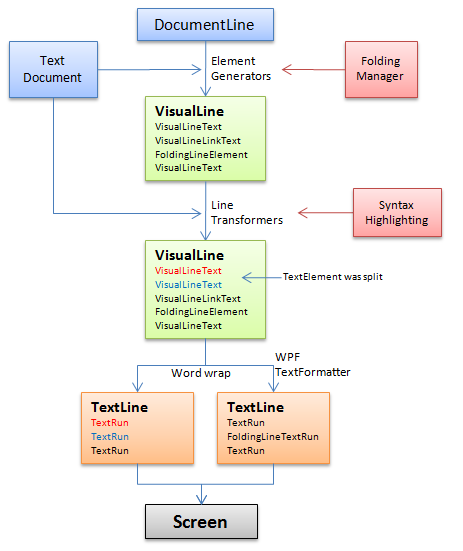
The ICSharpCode.AvalonEdit.Rendering.TextView class is the heart of AvalonEdit.
It takes care of getting the document onto the screen.
To do this in an extensible way, the TextView uses its own kind of model: the VisualLine.
VisualLines are created only for the visible part of the document.
The creation process looks like this:
Did you learn anything interesting/fun/annoying while writing the code? Did you do anything particularly clever or wild or zany?
Keep a running update of any changes or improvements you've made here.
Note: although my sample code is provided under the BSD license, ICSharpCode.AvalonEdit itself is provided under the terms of the GNU LGPL.